Quick Tips: How to Translate a PDF Document from English to Spanish
With globalization advancing, cross – language communication demands are on the rise. 💡Whether it’s for academic research, business cooperation, or personal learning, translate a PDF document from English to Spanish might be required. 🤔But how can you accomplish the translation effectively and accurately? This article offers a systematic solution!


Quick Tips: How to Translate a PDF Document from English to Spanish
With international trade growing ever closer and cross – cultural exchanges becoming increasingly in – depth, Spanish has emerged as one of the widely used languages worldwide, fueling the growing demand for translating English PDFs to Spanish. The quality of translation not only directly impacts the user experience when using PDF documents but also plays a crucial role in ensuring the accuracy of information dissemination and the smoothness of international communication. So, what are the effective methods for translating a PDF from English to Spanish? Let’s delve into it~
✅ Preparation Phase
◻ Determine PDF Document Type
| Native PDFs contain extractable text, while scanned documents are image collections. This distinction determines whether OCR processing is needed later. This is the most straightforward method—accurate judgment prevents detours. |
◻ Assess Content Completeness
| Check whether the PDF contains all necessary content elements. Beyond the main text, note whether there are table of contents, indexes, appendices, footnotes, etc. Some PDFs may have multiple versions or revision records; confirm you’re translating the latest version. |
◻ Check English PDF Quality
| Look for obvious spelling errors, formatting issues, or content inconsistencies. If the source text has problems, clarify in advance whether to correct or preserve them. Source quality directly affects translation quality. |
◻ Pre-organize Professional Terminology
| Consult authoritative dictionaries or industry standards to determine accurate Spanish equivalents for these terms, and create a terminology reference table to prepare for the translation phase, ensuring consistency and accuracy in terminology use. |
✅ Execution Phase
◻ Sentence Structure and Vocabulary: Flexible Adaptation to Context
English favors short sentences and passive voice, while Spanish typically uses active sentences and longer subordinate clauses. When translating, reorganize sentences according to Spanish’s natural word order. Additionally, a single English word often has multiple Spanish equivalents; select the most appropriate one based on specific context.
◻ Numbers and Charts: Standardized Conversion for Precise Presentation
Numbers, dates, currency, and units of measurement have specific representations in Spanish and must be converted to standards. Labels, legends, and annotations in charts must be translated. Since text is often embedded in images and Spanish vocabulary tends to be longer, translated text may exceed available space—plan ahead.
◻ Translation Tools: Select Appropriately Based on Needs
Different translation tools vary in functionality, accuracy, and cost. Translation websites are fast but offer moderate accuracy; professional software is feature-rich but requires learning time; human translation offers high quality but higher cost. Choose based on document complexity and purpose to improve translation quality and efficiency.
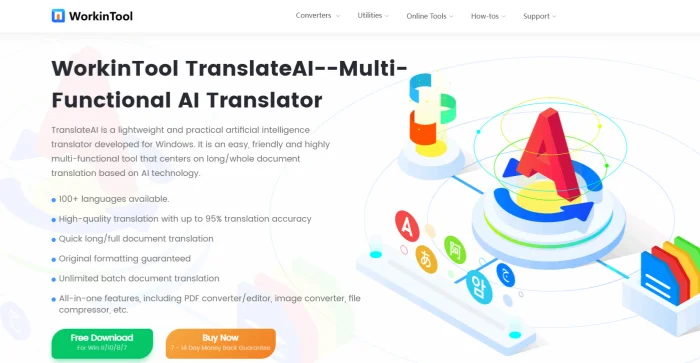
🔑TranslateAI (PC)
A user-friendly translation software with text, document, video, audio, and image translation functions, meeting translation needs across learning and work scenarios while balancing quality and efficiency.
📝Steps:
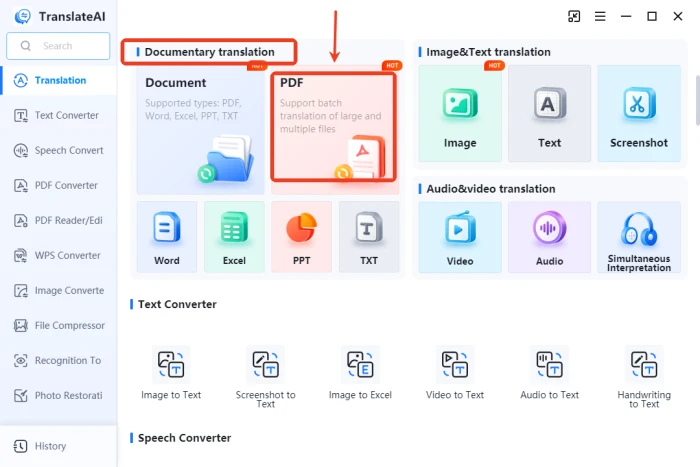
◽1.Open the software and select 【PDF】 under “Documentary translation.”
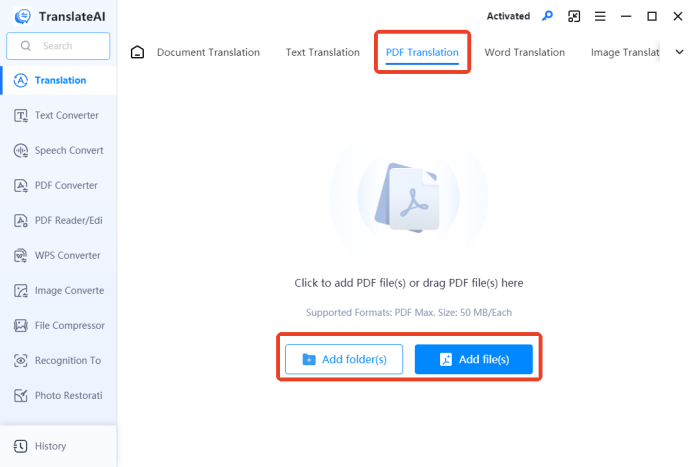
◽2.On the auto-redirected “PDF Translation” interface, add target files (multiple selections supported).
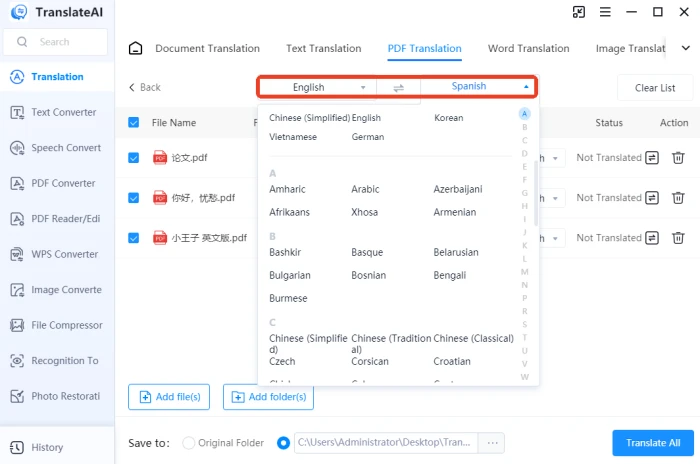
◽3.Set source language to English and target language to Spanish. By default, the entire document is translated, but you can also select specific pages.
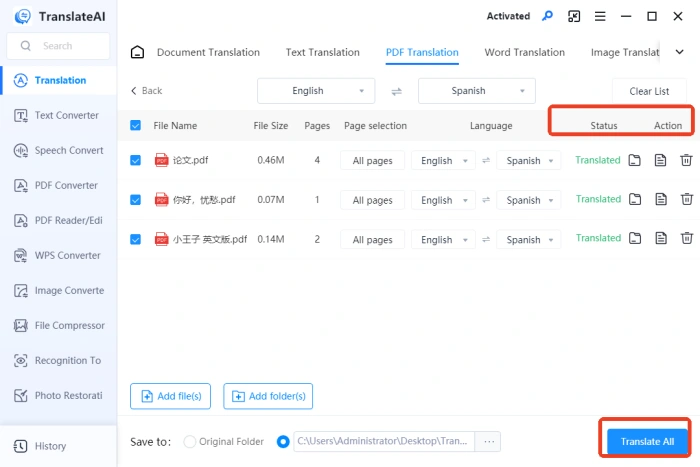
◽4.Click “Translate All” in the bottom right. After translation, you can view original and translated text side-by-side.
🔑PDF Translator (Web)
An online PDF translation platform by WorkinTool with a clean interface and intuitive operation, supporting 30+ languages. It automatically converts source text to the target language while preserving original formatting, requiring no manual adjustments.
📝Steps:
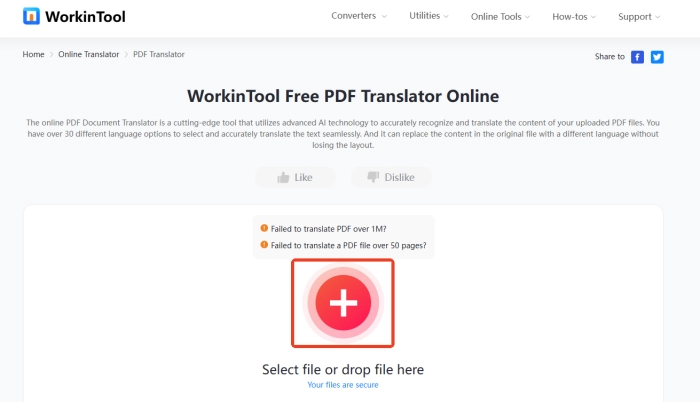
◽1.First, input your target PDF file. (It supports up to 1MB file within 50 pages.)
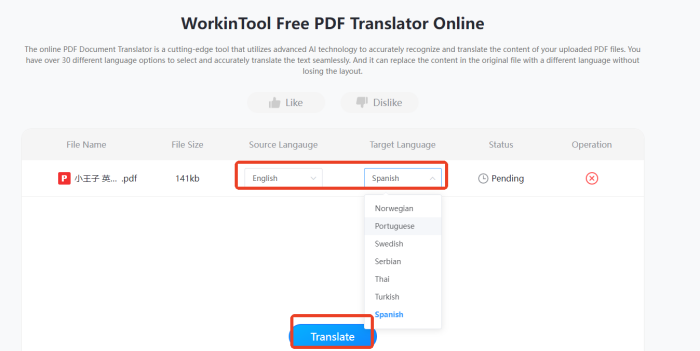
◽2.Adjust the source and target languages. Then, click Translate.
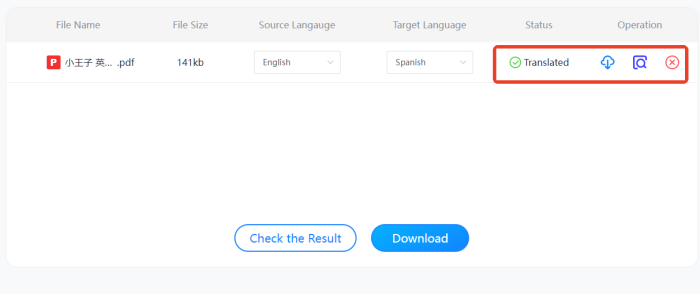
◽3.Wait for the process to complete. Check the result and download the translated PDF document.
✅ Refinement Phase
📢Quality Assurance
| Check Dimension | Check Content | Check Method | Pass Standard |
| Spelling & Grammar | Word spelling, verb conjugation, tense agreement | Use grammar checking tools for scanning; manual line-by-line review | No spelling errors; grammar compliant |
| Terminology Consistency | Professional terms, industry jargon, fixed expressions | Compare against terminology table; full-text index verification | Uniform terminology without ambiguity |
| Format Conversion | Date format, currency symbols, unit conversion | Check and replace per regional standards | Format matches target region conventions |
| Special Characters | Accent marks, inverted punctuation, hyphens, quotation marks | Test across multiple font encoding environments | Special characters display correctly and completely |
| Layout & Formatting | Title hierarchy, paragraph indentation, line spacing, margins | Side-by-side comparison of original and translated text | Layout remains essentially consistent |
| Chart Elements | Chart titles, axis labels, legend descriptions | Extract and check charts individually | Chart translation accurate and clearly expressed |
| Interactive Functions | Hyperlink targets, bookmark navigation, table of contents links | Activate and test in target environment | All links point correctly and function properly |
| Page Numbers | Page number continuity, table of contents pages, headers/footers | Record and verify each page | Page numbers continuous, accurate, and complete |
🌈Delivery Process
★ Issue Correction: Address identified problems by priority
★ Format Adjustment: Fine-tune layout, fonts, spacing, etc.
★ Native Review: Invite native speakers to review content
★ Feedback Processing: Revise content based on review comments
★ File Export: Generate final deliverable files meeting standards
✨Conclusion
Translating a PDF document from English to Spanish involves far more than just simple text conversion. It encompasses key processes such as file parsing, text extraction, language conversion, and format restoration, along with numerous other essential steps. 💥Any mistake at any stage could significantly compromise the accuracy and practicality of the final translation. 💪I hope this comprehensive breakdown enables you to carry out translation tasks with ease and efficiency.

Related Article
 How to Translate a Letter from English to Spanish
  How to Translate Spanish to English on PC 2024 | 3 Solutions How to Translate Spanish Audio to English | Inventory of Useful Tools