


How to Translate a PDF File: A Guide for Students & Professionals
💥Foreign-language PDFs have become commonplace in study and work—academic papers, technical manuals, business documents… But language barriers can feel daunting. 👀In fact, once you master a few practical PDF translation methods, you can easily read all kinds of foreign materials, so that language is no longer a reading barrier and information access becomes more convenient❕


How to Translate a PDF File: A Guide for Students & Professionals
PDFs are widely used in study and work thanks to their cross-platform compatibility, preserved formatting, and other features. However, when facing foreign-language PDFs, translation needs naturally arise. Unlike plain text files, PDF translation involves multiple challenges such as text extraction, format retention, mixed text-image layouts, etc. This article walks you through how to translate a PDF file—so if you’re interested, keep reading!
🔎Preparation Before PDF Translation
🔹Define your needs: After receiving a PDF, first determine your translation goal—is it for a rough understanding of the general content or precise translation of details? Is it for temporary reference or long-term use? Different needs correspond to different solutions.
🔹Back up the original: Before translating, it’s recommended to back up the original PDF file. The translation process may involve format conversion or content modification—keeping the original file can prevent data loss caused by operational errors.
🔹Check permissions: Some PDF files have encryption or access restrictions, preventing direct copying, editing, or printing. In such cases, you need to remove the restrictions first or contact the file owner to obtain proper authorization before proceeding.
🔹Confirm languages: Identify the source language and target language of the PDF file. If the document involves multiple languages, plan the translation strategy for each section in advance to prevent omissions or confusion and ensure the translation is complete and unified.
🔹Count the pages: Check the total page count and content volume of the PDF in advance. If there are fewer pages, you can process them all at once; if there are more pages, you need to process them in batches or allow sufficient time to reasonably arrange the overall translation schedule.
🔹Preview the layout: Browse the overall layout structure of the file and note whether there are special elements such as charts, formulas, annotations, etc. These contents require special handling during translation—understanding them in advance helps you develop targeted solutions.
📝Identifying the File Type
🎈How to Check
After opening the PDF file, try selecting the text with your mouse. If you can select and copy it, it’s a text-based PDF; if you cannot select it, it’s likely a scanned image that requires recognition technology to process.
🎈Type Reference
| File Type | Common Sources | Difficulty | Next Steps |
| Native PDF | Business contracts, e-books, official reports, and other files from formal channels | ★★☆☆☆ | Text content can be extracted directly from the document, then translated |
| Scanned PDF | Historical archives, paper contracts, handwritten manuscripts, and other scanned files | ★★★★☆ | Requires OCR technology to recognize text in images, then translate |
| Encrypted PDF | Trade secrets, personal privacy, copyright protection, and other restricted-access files | ★★★☆☆ | Requires entering the correct password or removing restrictions first, then process |
🌈Practical Translation Methods
✅ TranslateAI (PC)
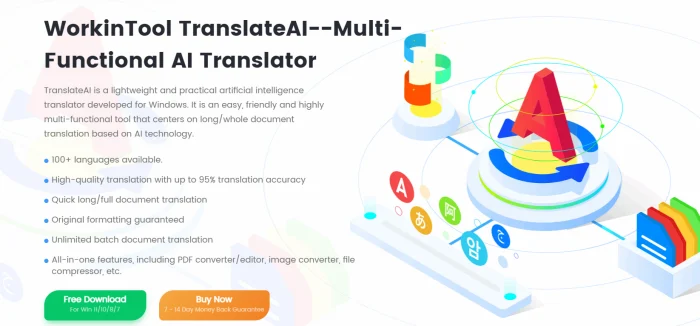
A translation software combining professionalism with ease of use, integrating multiple translation modes such as text, documents, video, audio, images, etc., effectively meeting the needs of study, work, travel, and other scenarios. Both translation speed and quality are reliable.
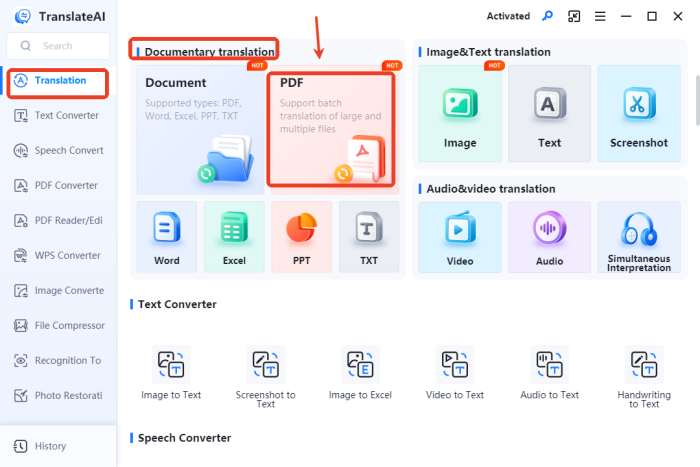
◽Step 1: Open the software and find [PDF] under the “Documentary translation” module on the homepage.
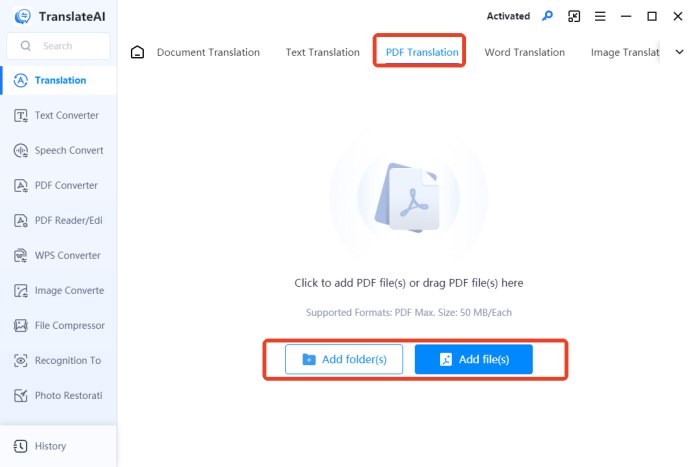
◽Step 2: Import one or more target files in the operation interface. File size cannot exceed 50MB.
◽Step 3: Set source and target languages. Full-document translation is the default; you can also manually select specific pages you want to translate.
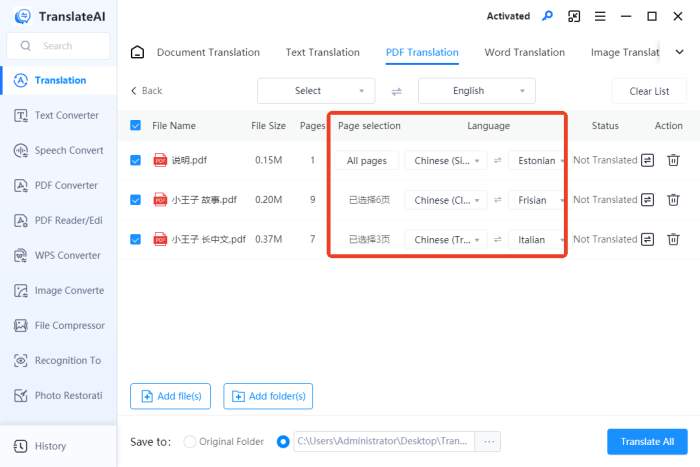
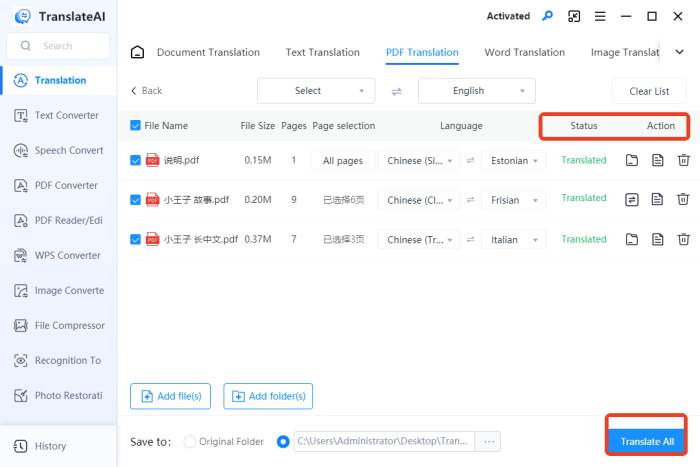
◽Step 4: Click “Translate All.” Once complete, you can also compare and read the original text and translation side by side.
✅ PDF Translator (Web)
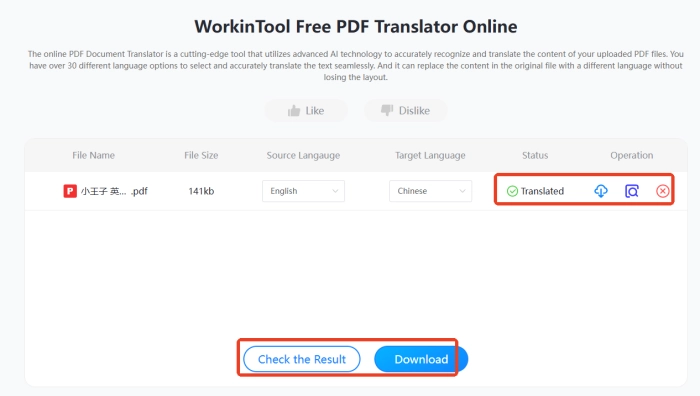
An AI-powered online tool provided by WorkinTool, supporting over 30 languages. It’s simple and fast—automatically replacing original content with your selected language while keeping the original file’s layout unchanged.
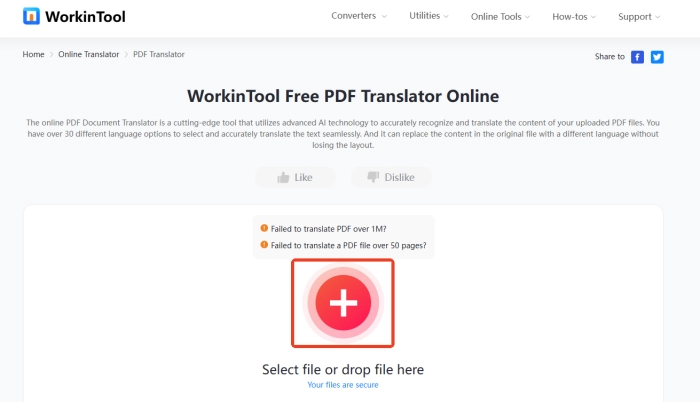
◽Step 1: First, input your target PDF file. (It supports up to 1MB file within 50pages.)
◽Step 2: Adjust the source and target languages. Then, click “Translate.”
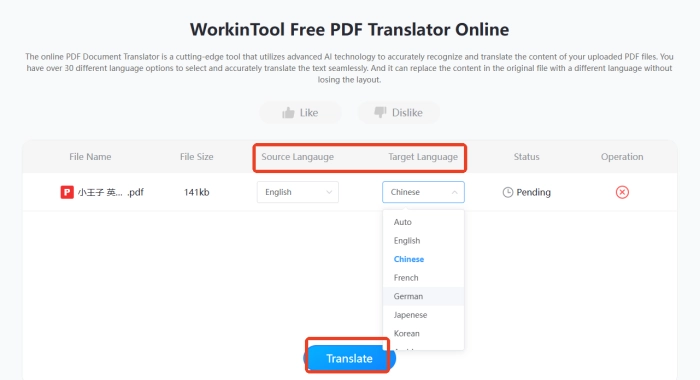
◽Step 3: Wait for the process to complete. Check the result and download the translated PDF document.
🤔FAQs About PDF Translation
📌Q1: Are there file upload limits?
A1: Different platforms have different requirements for file size and page count. It’s recommended to check the relevant rules beforehand.
📌Q2: Will the format change after translation?
A2: Some platforms can preserve the original layout well, but complex formatting tends to have deviations that require later adjustments.
📌Q3: How do I choose the right platform?
A3: It’s recommended to test with a short text passage first, then decide whether to use it for the completedocument.
📌Q4: Is my uploaded file secure?
A4: Reputable platforms generally use encryption. It’s recommended to review the privacy policy before use.
📌Q5: What affects translation speed?
A5: Mainly related to file size, page count, and network conditions. Long documents require patience.
🔔Tips for Improving Translation Quality
📍 Proofread the Translation
| ▪ Terminology accuracy — Technical terms consistent throughout
▪ Natural expression — Sentence structures conform to target language conventions ▪ Complete content — Check for omissions, mistranslations, or over-translations ▪ Logical coherence — Smooth connections between preceding and following text ▪ Correct grammar — Consistent tense, voice, and person ▪ Unified style — Do not mix formal and colloquial language |
📍 Fix Formatting
| ▪ Paragraph spacing — Uniform line spacing for visual comfort
▪ Font hierarchy — Clear distinction between headings and body text ▪ Table alignment — Correct alignment within cells ▪ Headers/Footers — Page numbers displayed in correct positions ▪ Punctuation style — Do not mix Chinese and English punctuation ▪ Number formats — Unified formatting for dates, amounts, etc. |
✨Conclusion
Translating a PDF file is rigorous and systematic work, encompassing multiple stages such as requirement confirmation, method selection, content extraction, quality control, etc., with each stage interconnected and indispensable. 💪We hope the methods and tips provided in this article bring practical help to your translation practice. 📢Of course, mastering the basic methods is just the starting point—only through continuous accumulation and improvement in practice can language truly become a bridge for information exchange rather than a barrier to knowledge acquisition.

Related Article
 A Guide to Translate a PDF Document: Boosting Precision How to Translate a Video: A Comprehensive Guide How to Translate an Excel Document:A Quick Start Guide