How to Translate Word Document: A Step-by-Step Tutorial
In an increasingly globalized world, cross-border communication has become more frequent than ever. As a mainstream content carrier, Word documents require multilingual translation more than ever before. 📢Whether for international business, academic research, or information gathering, choosing the right translation method can significantly improve efficiency. 💪This article provides you with solutions to enhance both the efficiency and quality of your translations.


How to Translate Word Document: A Step-by-Step Tutorial
As globalization accelerates, cross-language communication has become the norm. Whether conducting international business cooperation, advancing academic research, or enhancing professional competitiveness, document translation plays an important role. Word documents, in particular, serve as a common medium for office work and academic exchange, making their translation accuracy and professionalism important considerations. Do you know how to translate Word document❔ If interested, keep reading~
🔎 Translation Strategies for Different Types of Word Documents
| Document Type | Core Requirements | Translation Focus | Considerations |
| Business Documents | Accuracy and professionalism | Standardized terminology; accurate numbers; formal expression | Avoid ambiguity; localize currency and dates; verify legal clauses carefully |
| Academic Documents | Rigorous style | Academic tone; precise citations; standardized terminology | Verify authoritative terms; maintain citation format; annotate abbreviations on first use |
| Technical Documents | Clear logic | Accurate terminology; clear steps; distinct logic | Code requires no translation; ensure step hierarchy accuracy; provide complete parameter descriptions |
| Creative Documents | Strong expressiveness | Accurate information; flexible expression; cultural integration | Convey original intent; consider cultural acceptance; flexibly adapt rhetoric |
👀 Core Techniques for Word Document Translation
✨Utilize Translation Memory: For Word documents requiring frequent translation, implementing a translation memory is important. It stores previous translations, allowing quick retrieval for subsequent translations, improving efficiency while ensuring consistency.
✨Build a Professional Terminology List: If your Word document contains numerous professional or industry-specific terms, creating a terminology list is necessary. This ensures consistent terminology usage throughout the translation, helping to reduce translation errors.
✨Translate with Context in Mind: Translation cannot rely solely on literal word meanings; you must consider the context within the document. The same word carries different meanings in different contexts and requires flexible translation to accurately convey the original intent.
✨Keep Translations Concise and Clear: During translation, aim for precision and clarity in your target text, avoiding lengthy and complex sentence structures. Simultaneously, accurately capture the original tone and style to ensure emotional expression remains consistent.
🌈 Practical Methods for Word Document Translation
🔑TranslateAI
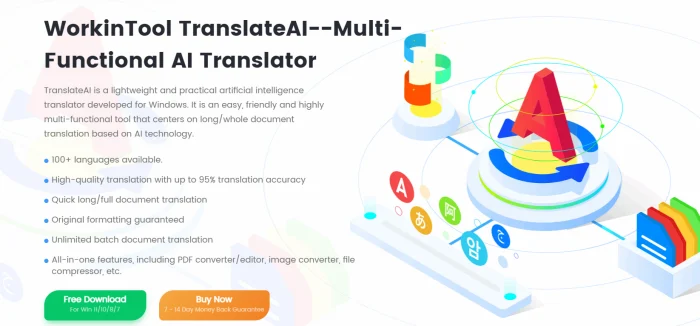
A professional and intelligent desktop translation software that integrates multiple translation modes for PDF, TXT, images, and videos. In addition, it is equipped with practical functions such as conversion, compression, recognition, and repair, helping to enhance both office efficiency and quality.
Detailed Steps:
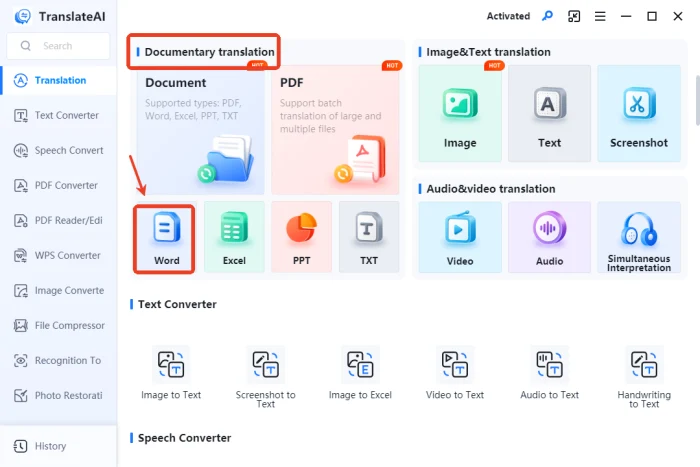
◽1.Find and click [Word] in the “Documentary translation” module on the homepage.
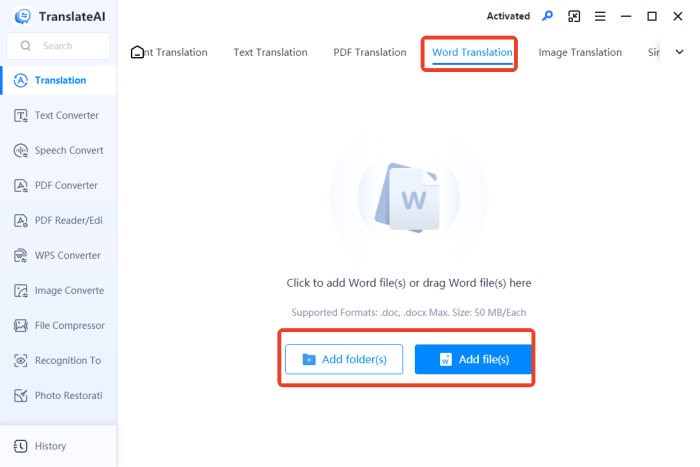
◽2.Add files as needed; you can select multiple files at once, supporting both doc and docx formats, with a maximum size of 50MB.
◽3.Select your translation language pair; in addition to unified settings, you can customize individual Word files.
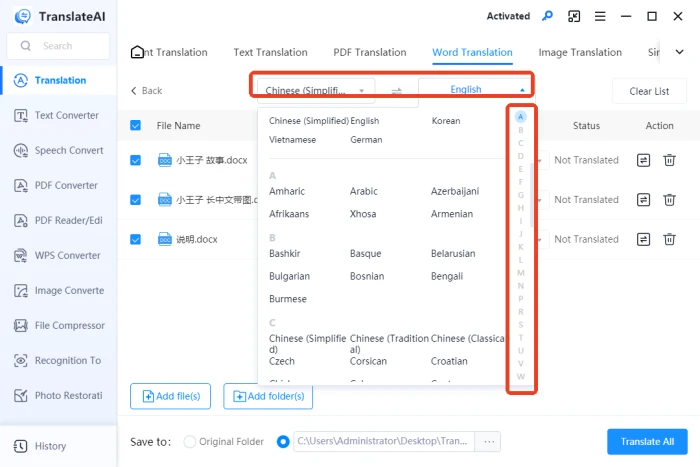
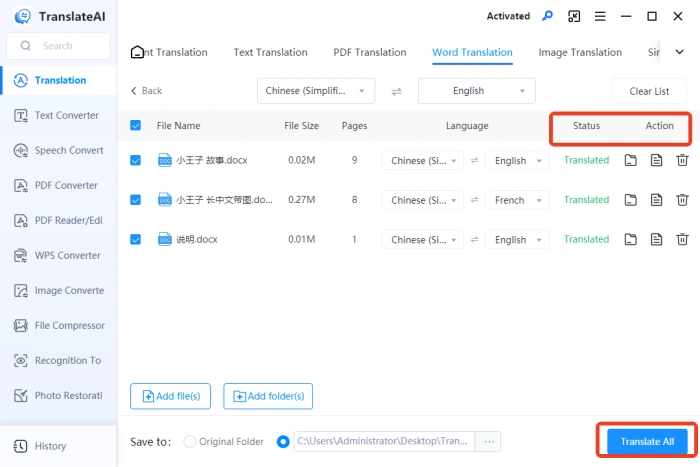
◽4.After confirming everything is correct, click “Translate All“; once it displays “Translated,” you can open and view the results.
🔑Word Translator
A document translation website launched by WorkinTool that supports mainstream formats including Word, PPT, Excel, TXT, and PDF. The interface is clean and intuitive, with straightforward operation. With just a few simple steps, you can obtain high-quality translation results.
Detailed Steps:
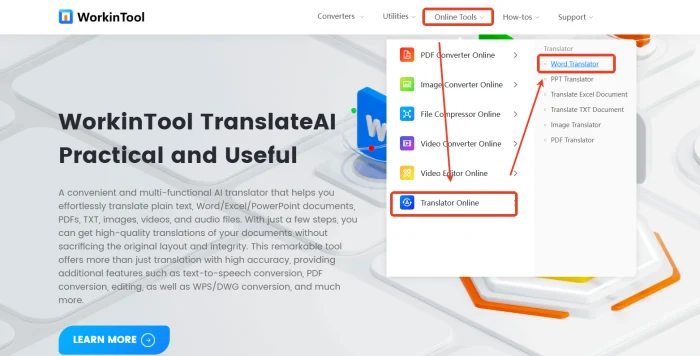
◽1.Click “Online Tools” at the top of the interface and select [Word Translator] under the “Translator Online” section.
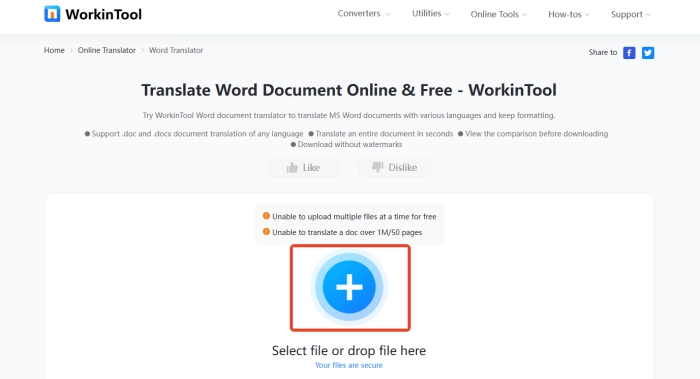
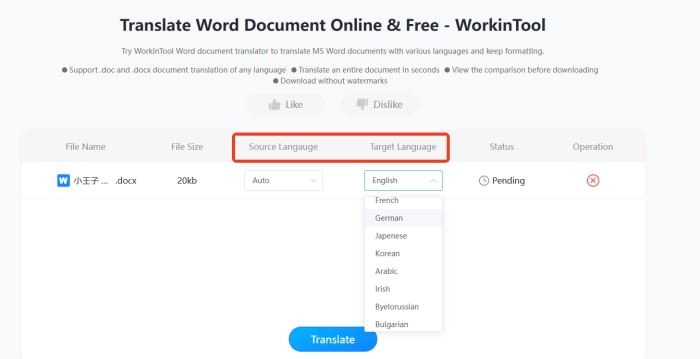
◽2.Click the “+” button or drag and drop a DOC/DOCX file here to upload.
◽3.Configure the original and target languages and click Translate to start.
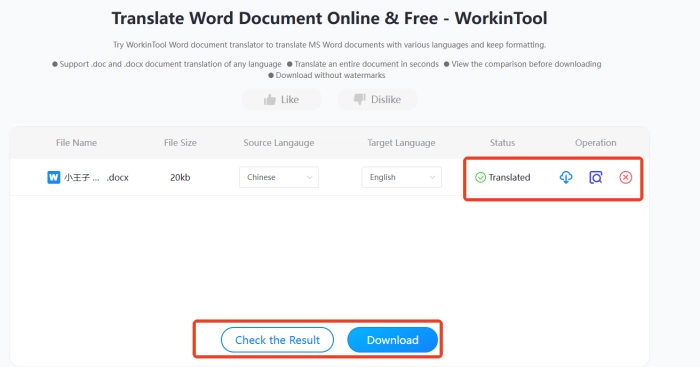
◽4.Preview the translated document and download it for free.
📝 Quality Control and Review of Translations
🟪 The Importance of Proofreading
| Proofreading after completing a Word document translation is a critical step in ensuring quality. Regardless of which translation method you use, checking and reviewing are necessary. This process often takes longer than the translation itself, but it is essential for quality assurance. |
🟪 Proofreading Checklist
| ◾ Content: Check for omissions or repetitions; compare the original and translated text paragraph by paragraph to ensure all information is accurately conveyed.
◾ Terminology: Cross-reference the terminology list to verify professional terms are translated correctly, ensuring consistent terminology throughout the document. ◾ Readability: Check for obscure or verbose expressions in the document; ensure target readers can understand it easily. ◾ Logic: Verify logical relationships between paragraphs are clear and sentence structures follow the target language’s conventions. ◾ Formatting: Check that fonts, font sizes, line spacing, and other formatting match the original; verify special formats like titles and tables are correctly preserved. ◾ Special Information: Verify numbers and dates are correctly transcribed; ensure special symbols, formulas, and code are completely preserved. |
🟪 Multi-Level Review Process
| ◻ Initial Proofreading Stage: Conduct initial proofreading to identify obvious errors and omissions, focusing on spelling/grammar errors and formatting issues. Create a checklist and systematically verify each section.
◻ Professional Review Stage: Have personnel with relevant domain knowledge and practical experience conduct the review, focusing on verifying consistency and accuracy of professional terminology, ensuring expression meets industry standards and regulations, and enhancing reliability. ◻ Comprehensive Review Stage: Assess the Word document from a holistic perspective, including structural coherence, logical coherence, and formatting compliance, ensuring it meets quality requirements for publication or delivery. |
💡 Frequently Asked Questions About Word Document Translation
Q1: Which is better—machine translation or human translation?
A1: Both machine translation and human translation have their advantages and disadvantages. For documents with lower quality requirements and tight timelines, machine translation may be considered; for important, highly specialized documents, human translation is recommended.
Q2: How should I handle obscure vocabulary when translating?
A2: When encountering obscure terms, first consult professional dictionaries and online corpora for definitions. If still unclear, infer the general meaning from context, or consult with professionals to obtain accurate explanations before translating.
Q3: How can I ensure the translated text maintains the same style as the original?
A3: First, deeply understand the original style; when translating, select vocabulary and sentence structures that match that style. For example, use standardized terminology for formal texts and rhetorical devices for literary texts. After completing the translation, compare with the original style and make repeated adjustments.
Q4: How can I evaluate the quality of a translation?
A4: Assess translation quality from multiple dimensions including accuracy (faithfulness to the original), fluency (smoothness and naturalness of sentences), and completeness (absence of information loss). You can also seek feedback from native speakers.
🎊Conclusion
When undertaking Word document translation, you should select an appropriate solution by considering document type, intended use, and balancing factors such as time and cost. Pre-translation preparation and post-translation proofreading are important factors in determining translation quality. We hope the methods introduced in this article provide helpful guidance, assisting you in optimizing your translation workflow and improving translation accuracy.

Related Article
 How to Translate a Document - PDF, Word, Excel Translation How to Translate a Word Document to Spanish on PC 2024
  How to Translate a Word Document into Spanish | Recommended Tools