


How to Translate a PPT to English: A Quick Start Guide
With the growing trend of international collaboration and academic exchange, the need to translate PPTs into English has grown. 💥But once you actually start, you realize it’s trickier than expected—layouts get messed up, charts are hard to edit, and terminology is difficult to translate… Many have run into these pitfalls. 💡This article takes a practical approach to help you streamline the process and make PPT translation more manageable.


How to Translate a PPT to English: A Quick Start Guide
When you open a PPT that needs English translation, what’s your first instinct? Screenshot each slide, translate sentence by sentence, then paste one by one? For short, simple files, manual work is manageable. But when you encounter PPTs with lots of charts and complex formatting, traditional methods fall short. If you’re still unsure how to translate a PPT to English, read on—this should save you some trouble❕
🔔 Pre-Translation Preparation
🟡 Back up the original file: Always create a complete backup before starting. If you accidentally delete content or mess up formatting, you can restore it anytime without redoing everything.
🟡 Create a terminology glossary: Finalize English translations for key terms in advance. This saves time during translation and ensures consistency throughout.
🟡 Gather reference materials: Find previous English PPTs, official website content, or industry reports. Having ready references lets you adopt existing translations and reduces guesswork.
🟡 Assess the workload: Quickly scan the entire file—count total slides, text density, and charts. The hidden workload often exceeds expectations; early assessment helps with planning.
🌈 Key Points for PPT English Translation
【Expression Habits】
| ◽ Chinese often uses modest language; English tends to be more direct. ◽ Chinese frequently favors passive voice; English generally prefers active voice. |
【Visual Symbols】
| ◽ Color meanings differ across cultures. ◽ Visual symbols can be interpreted in different ways. |
【Rhetoric】
| ◽ Idioms should be translated by meaning, not word-for-word. ◽ Avoid using culturally sensitive expressions. |
【Numbers & Formats】
| ◽ Date order differs between the UK and the US. ◽ Thousand separator conventions differ. |
🔑 How to Translate a PPT to English
✅ TranslateAI
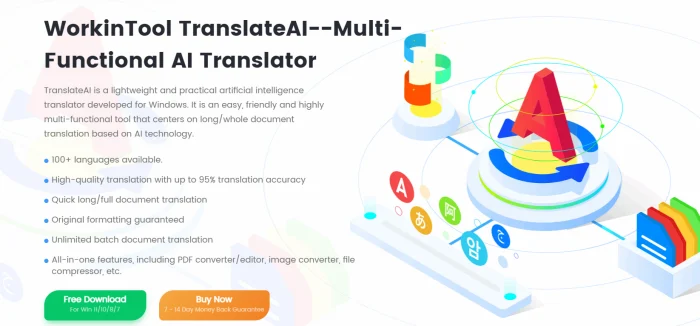
A professional, intelligent desktop translation software that integrates PDF, video, audio, and image translation modes. It can easily fit into study, work, and travel scenarios, making cross-language communication effortless with a smooth translation experience.
📝Usage:
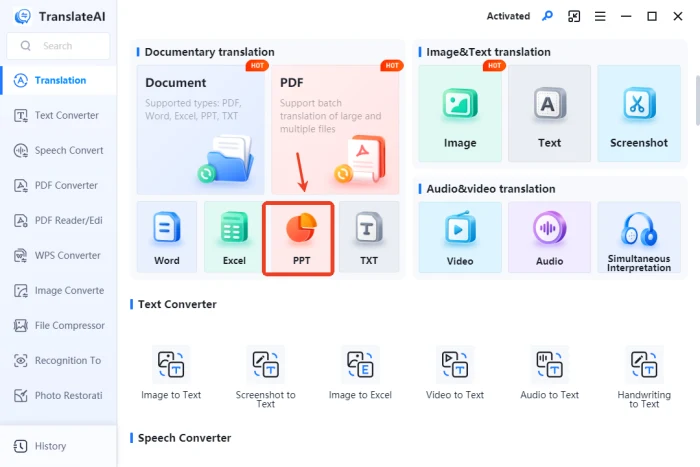
◾ Step 1: Visit the website, download and install the software, then open it and select 【PPT】 on the homepage.
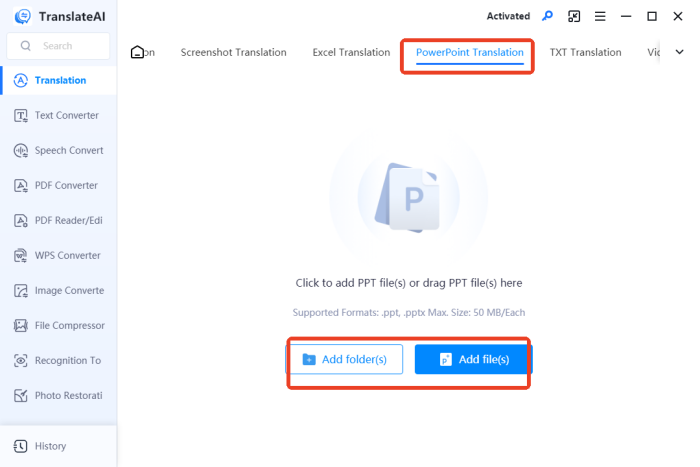
◾ Step 2: On the【PowerPoint Translation】 page, add single or multiple files. The maximum size: 50 MB/Each.
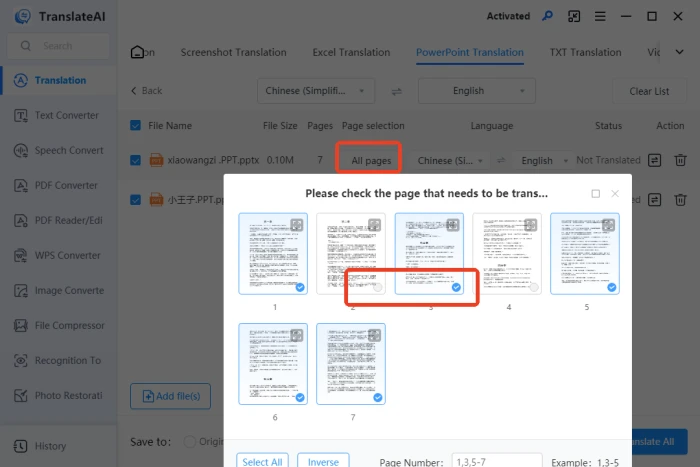
◾ Step 3: By default, all pages of each file are translated; you can also select specific pages.
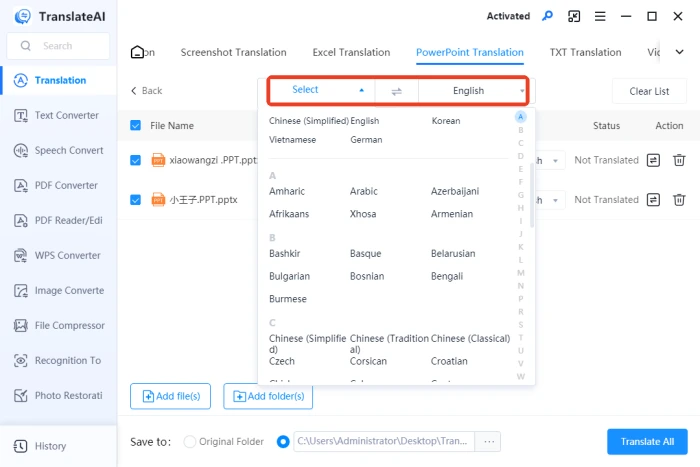
◾ Step 4: Set the source language and choose “English” as the target language.
◾ Step 5: Click “Translate All” at the bottom, then view the results once complete.

✨ Post-Translation Review & Optimization
| 🔎Review Item | 📍Details | ✍Optimization Tips |
| Grammar and Spelling Check | Carefully check the use of tenses, subject-verb agreement, article usage, as well as the accuracy of word spelling and punctuation. | Utilize professional grammar-checking tools like Grammarly for multiple rounds of inspection and correction. |
| Terminology Consistency | Verify the consistent translation of technical terms throughout the entire document. | Create a terminology glossary; adopt industry-standard translations. |
| Cultural Adaptation | Transform Chinese-style expressions into natural English; avoid awkward literal translations. | Adopt the conventions of the target language to enhance fluency. |
| Conciseness | Remove redundant modifiers and repetitions; keep each slide focused. | Follow the principles of PPT simplicity; convey key messages with minimal text. |
| Tone Consistency | Maintain a consistent level of formality appropriate for business reports or academic presentations. | Use professional written language throughout. |
| Number & Unit Conversion | Check whether units, currency symbols, and date/time formats comply with the conventions of the target audience. | Adjust all numbers and units according to the standards of the target region. |
| Visual Element Check | Ensure that chart labels, legends, and image captions are translated completely and accurately. | Guarantee that all text within visual content is handled properly. |
| Layout Adjustment | Confirm that font size, line spacing, and alignment remain visually appealing after translation. | Adjust font size or simplify text to prevent overflow. |
👀 PPT Translation FAQ
📌 Q1: Text becomes longer after translation and the layout is messed up. What should I do?
A1: It’s common for English text to be longer than Chinese. Try condensing the translation, reducing font size, adjusting line spacing, or breaking long sentences into bullet points. Redesign the layout if necessary.
📌Q2: How do I accurately translate technical terms in a PPT?
A2: Thoroughly understand the context, consult authoritative sources or industry standards, and ensure precise terminology. If necessary, verify with domain experts or specialized dictionaries.
📌Q3: How do I convert Chinese expressions into natural English?
A3: Avoid word-for-word translation. First, understand the meaning, then restructure using English logic—present conclusions first, then details. Cut unnecessary preambles common in Chinese to make expressions more concise and impactful.
📌Q4: How do I choose the right translation style for different scenarios?
A4: Academic PPTs should be rigorous with professional terminology. Business PPTs need to be concise and highlight key points. Cultural presentations should be vivid and engaging. Make adjustments flexibly based on your audience.
📌Q5: Do numbers, dates, and units need adjustment?
A5: Yes. Format standards vary by region—date formats, currency symbols, measurement units, etc. Convert them all according to target language conventions to ensure clear and accurate communication.
✨ Conclusion
Translating a PPT to English is a comprehensive task—from understanding the content deeply, adapting expressions flexibly, to adjusting formats carefully. Each step deserves attention.💪Whether for workplace reports, academic exchanges, business negotiations, or product presentations, a well-crafted translation enhances your presentation and helps ideas cross language barriers for effective and engaging delivery. 🌈I hope this guide helps you navigate bilingual situations with ease and confidence.

Related Article
 How to Translate an Excel Document:A Quick Start Guide How to Translate English to Spanish | 4 Quick Translation Tips
  Quick Tips: How to Translate a PDF Document from English to Spanish