How to Translate a Text from a Picture: A Beginner-Friendly Guide
In today’s information-abundant world, text hidden in images is like treasure waiting to be discovered. 🔎Whether it’s study materials, business contracts, travel guides, or movie posters, the demand for translating text from images keeps increasing. 🌈Don’t worry—with the right methods, you can overcome language barriers and enjoy diverse content freely.


How to Translate a Text from a Picture: A Beginner-Friendly Guide
Driven by the digital wave, images have become an important window for acquiring knowledge and understanding the world, owing to their intuitive and vivid nature.🤔However, once images contain foreign – language text, how to translate a text from a picture quickly and accurately turns into a thorny problem—an invisible barrier that blocks smooth information access. 🙋♀️Want to know how to resolve this dilemma? Read on~

🔔Preparation Before Translating Text from Images
| 📍 Check Point | 🎈 Requirements | 📢 Implementation Method |
| ▪ Text Clarity | Avoid blur or focus issues; ensure readability | Adjust brightness and contrast, or retake the photo |
| ▪ Image Angle | Keep the image perpendicular to the camera | Use editing software/tools to rotate and correct the angle |
| ▪ Text Completeness | All text to be translated must be visible | Check the original image line by line for completeness |
| ▪ Privacy Protection | Hide or obscure sensitive information | Use software tools to blacken or blur sensitive data |
| ▪ File Format | Common formats with appropriate file size | Prioritize JPG or PNG formats |
👀Choosing Translation Tools for Different Scenarios
◾ Academic Research
| Academic work demands high translation accuracy, involving specialized terminology and scholarly concepts. Desktop software with customizable dictionaries can improve accuracy, and tools that preserve formatting maintain original layouts. Results can be adjusted or even combined with human translation. |
◾ Business Documents
| Business files involve confidential information and legal liability, making security the top priority. Choose local desktop software or cloud services with strong security features, ensuring complete audit logs, version control features, and clear data protection commitments. |
◾ Educational Learning
| Students frequently need to translate textbooks and reference materials, where both accuracy and comprehension matter. Combine online dictionaries with learning tools to ensure translation quality while aiding understanding. Saving results also helps with review and comparison. |
◾ Travel and Tourism
| While traveling, you need to quickly identify text on signs and menus—mobile apps with real-time photo translation work well. Offline mode is important since foreign networks can be unstable. Prioritize apps supporting your destination language and download offline packages in advance. |
🔑Methods and Steps for Translating Text from Images
✅ TranslateAI
A desktop translation software covering multiple translation modes including PDF, Word, video, and screenshots, supporting over 100 languages. It also includes tools for conversion, compression, and recognition to meet various needs.
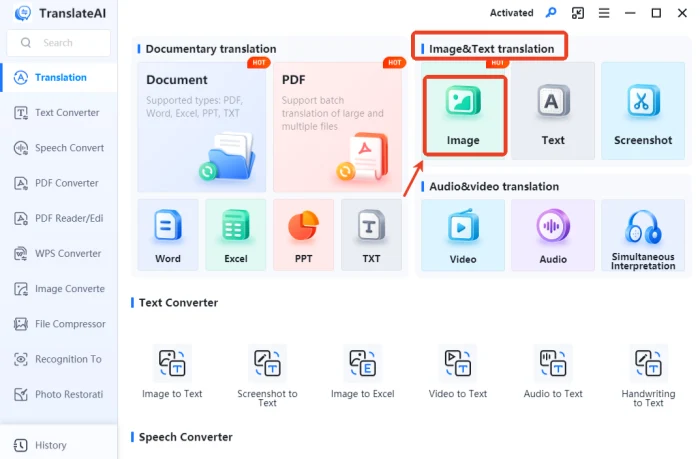
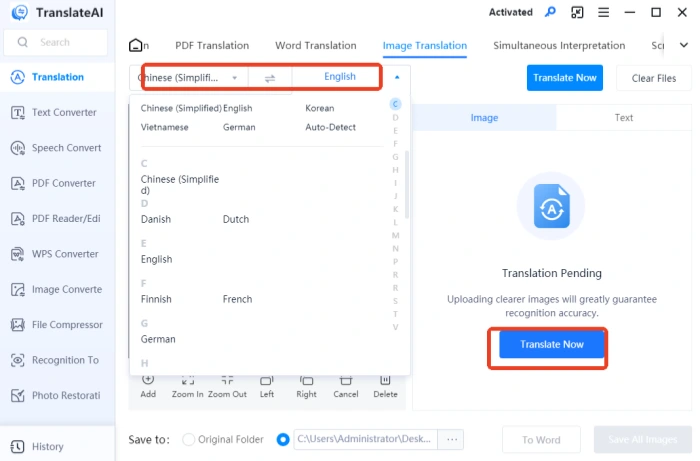
◻ Step 1. On the main interface, locate [Image] in the “Image&Text translation” section.
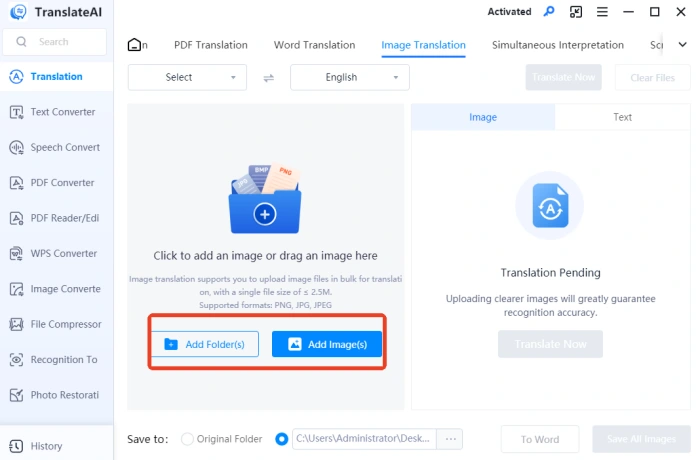
◻ Step 2. Select and add one or multiple target images; JPG, PNG, and other formats are supported, with a single file size limit of 2.5MB.
◻ Step 3. The tool supports preprocessing like zooming and rotating images, and you can also select specific image content for translation.
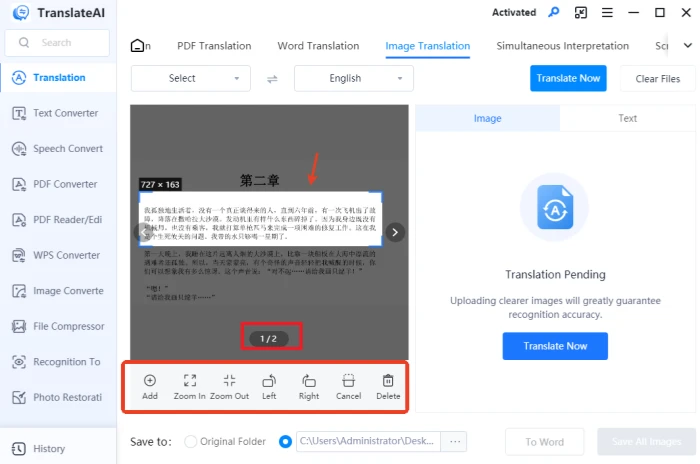
◻ Step 4. Set the source and target languages, then click the “Translate Now” button on the right side of the interface.
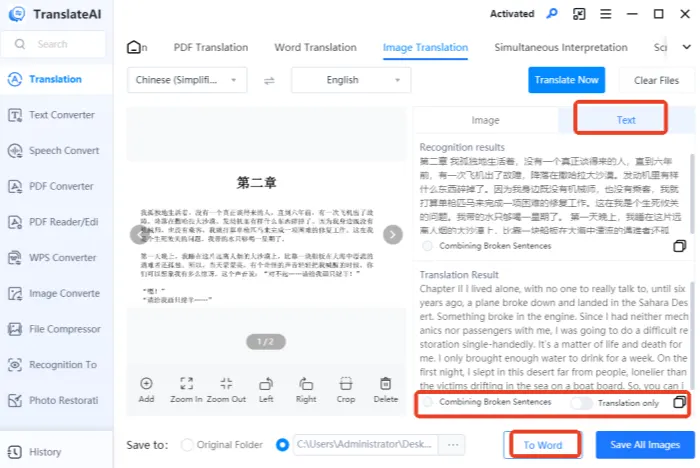
◻ Step 5. After translation completes, switch to the “Text” tab to view both original and translated text simultaneously. Features like sentence merging, one-click copy, and Word document generation are also supported.
💡Common Questions and Solutions for Translating Text from Images
📌Q1: The translation differs from the original meaning?
A1: This is normal. Review the translation manually in context, and adjust manually if necessary to ensure accuracy.
📌Q2: How do I handle images with multiple languages?
A2: Translate different language sections separately, or use tools that support mixed multilingual translation.
📌Q3: What if specialized terminology isn’t translated accurately?
A3: Such terms require domain expertise. Use industry-specific dictionaries or conduct manual proofreading and correction.
📌Q4: How do I handle ambiguity in cultural expressions?
A4: Some idioms and cultural expressions are difficult to translate literally. Use free translation or add annotations to convey the original meaning.
📌Q5: The translated expression isn’t natural or fluent?
A5: Literal translation often sounds stiff. Adjust with free translation to make it more aligned with the target language’s expression habits.
📌Q6: The same word translates inconsistently in different contexts?
A6: Words have multiple meanings. Choose the appropriate translation based on specific context to maintain overall consistency.
📝Conclusion
Translating text from images may seem like a common task, but it actually holds significant practical value. ✨Whether it’s for undertaking cross – border learning and research, reviewing business documents, or navigating during international travel, it helps break down language barriers. To perform this task well, selecting the right method is crucial. 👍The TranslateAI mentioned in this article is worth giving a try. It is not only easy to operate but also offers both speed and quality, effectively meeting the needs of multiple scenarios.